

Discover Design Mobile First UX Strategies to Boost Conversions
Imagine your ideal customer, likely on the move, scrolling through their phone while waiting in line for coffee on their way to work. Alternatively, they could be lounging on the couch, scrolling after a long day, possibly searching for content they missed earlier.
Designing for this moment isn’t just a technical requirement—it is an opportunity to forge a deeper connection. When we prioritize mobile first design, we acknowledge the reality of how people interact with the web. We strip away the clutter and focus on what truly matters.
Mobile isn’t “another version” of your site anymore—it’s the one Google pays attention to first. If your mobile experience is slow, cluttered, or hard to use, your visibility in search takes a hit. Get mobile right, and you stay discoverable, accessible, and ready for new visitors.
Let’s explore how we can design mobile experiences that don’t just work but truly inspire and convert.
Mobile First Design Explained
The digital landscape has shifted permanently. With mobile devices serving as the primary gateway to the internet for most users, search engines have adapted their priorities. Google’s shift to mobile-first indexing isn’t a rumor or a “coming soon” update—it’s the playing field. As of July 5, 2024, Google moved to crawling sites with the mobile Googlebot, meaning the mobile version of your site is the version that matters most for indexing and rankings.
Like any reputable business, Google has user experience at the center of what it rewards—because that’s what keeps people using Google. So if your mobile experience is slow, cluttered, or hard to use, your site can feel less relevant in search results (even if your desktop site looks great).
Mobile is also where a lot of local and “I need this now” searches happen. If your mobile UX makes it easy to get answers, navigate, and take action, you’re not just “being nice to users”—you’re building the exact kind of experience that search engines are trying to serve.
SEO Trust Signals (The Basics)
Time on site (and page depth):
This one’s huge. When people stick around, scroll, click into other pages, and actually use your site, it’s a strong search signal that you’re answering the question and telegraphing search engines that you’re running a tight ship.
Speed: The need for mobile-page speed!
Speed explains itself—how long do you stare at a spinning wheel before you bounce? Most people expect a page to load and be readable in under ~3 seconds. Google doesn’t want their users waiting either, so slow websites lose ranking priority.
UX and clarity (no chaos):
Distracting design and confusing navigation drive people away to your competition. It takes about 0.05 seconds for someone to form an impression—so if the layout feels sketchy or hard to follow, trust drops instantly. Great UX is the hallmark of SEO because it keeps people engaged and moving forward.
Top Mobile First Design Strategies for Better UX & SEO
Creating a seamless mobile experience requires us to make strategic, user-centric choices. It is about understanding the limitations of the medium and turning them into strengths. From typography to touch targets, let’s look at the strategies that will elevate your design and improve user experience.
At Mighty Fine Co., mobile-first is our guiding philosophy, not a set procedure. Whether we’re sketching on a desktop canvas or a mobile frame, we always think mobile-first, stressing performance, clarity, and touch-friendly experiences from the outset.

Content Layout: The Art of the Stack
On a desktop, we have the luxury of horizontal space. On mobile, our canvas is vertical. This changes the game entirely. Mobile-first design emphasizes the importance of your “stacking order.” We need to guide the user’s eye down the page in a logical, engaging flow.
The goal is to place the content your viewers need to see right at the top. User attention spans are limited. If we bury the lead, we risk losing the audience before they even begin.
- Lead with the point: Put what you do and who it’s for right at the top. Ensure your message is clear and concise, as we frequently encounter sales language that is difficult to interpret from the search topic. Design mobile first is about capturing opportunities fast!
- Back it up fast: Add proof early, such as results, client logos, testimonials, or quick stats. Social proof can trust value to your site.
- Make the next step obvious: Use one clean Call to Action (CTA)—don’t make it a scavenger hunt.
- Assume zero patience: If the good stuff is buried, mobile users won’t explore—they will bail.

Website Typography: Clarity is King
Typography on mobile isn’t about being “fancy or clever”; it’s about being understood. You need to design mobile first fonts that are easily legible on smaller screens. Elegant and easy-to-read text is paramount for achieving an excellent UX experience.
Selecting fonts with a taller x-height is a great guideline. This refers to the height of the lowercase letters. Fonts with taller x-heights remain legible even when scaled down, making them perfect for mobile interfaces. While we can use flashier fonts for large headings, you should stick to easily visible sans-serif fonts for body content.
A good example is Google’s Open Sans for body copy. It manages the space between characters—known as “kerning”—beautifully. As Google describes it, Open Sans is “optimized for print, web, and mobile interfaces and has excellent legibility characteristics in its letterforms.”
Button Sizing: Designed for Touch
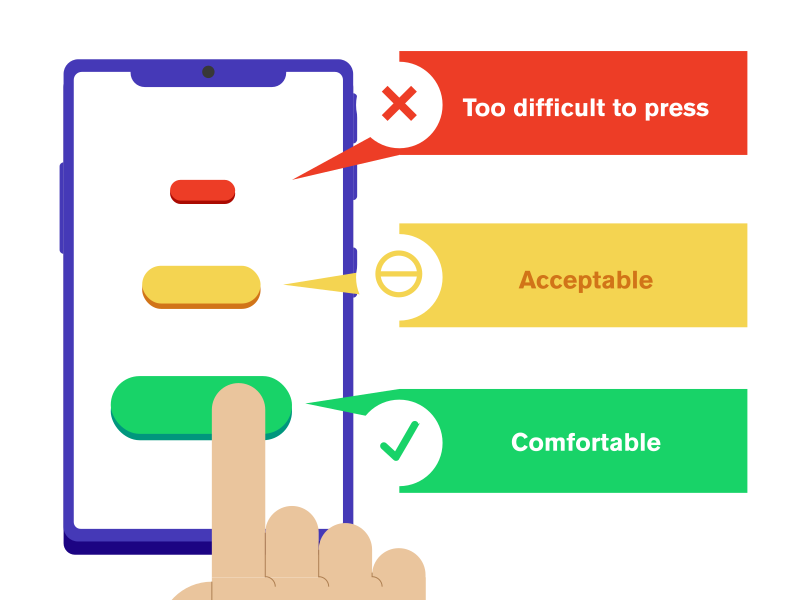
Tap targets are bigger than “just buttons”—anything clickable needs room to breathe. Links packed too tightly, tiny menu items, or cramped icons lead to mis-taps and instant frustration. Since finger sizes are static (and nobody taps with surgical precision), mobile-first UX means designing for real thumbs, not perfect cursor clicks. Make touch targets generous, keep spacing intentional, and treat that extra padding like usability—not decoration. When buttons sit too close together, users hit the wrong one, lose confidence, and bounce.

Button Placing: The Thumb Zone
Where you place your buttons is just as important as how big they are. Try a quick exercise: hold your phone in one hand and see how far your thumb can reach comfortably without shifting your grip. Unless you are Mister Fantastic, it’s probably not that far.
We never want to make it difficult for someone to click a CTA button when they are ready to convert. Place key conversion buttons within that easy-to-reach “thumb zone.” The exception is navigation buttons, like a hamburger menu. These can sit in the corners because the user is actively choosing to leave the current flow, so shifting their grip is acceptable.
Popups Suck: Try Not to Do It on Mobile
I don’t know anyone who has ever celebrated seeing a popup advertisement. Popups disrupt the user’s focus and take over the limited screen real estate. On mobile, this feels particularly intrusive.
Furthermore, finding the tiny “X” to close a popup on a phone screen can be a nightmare. If you absolutely must use a popup, ask yourself if it is truly necessary. If the answer is yes, ensure there is a super easy, obvious way to exit. If you’re like me, I’ll just leave if I have to find the Easter egg to close one out.
Mobile Performance Optimization
Speed is a feature. When designing, we must keep mobile webpage speed top of mind—it is non-negotiable. While mobile networks are faster than ever, we cannot rely on users having a perfect connection.
Importantly, SEO directly correlates with your mobile speed. A faster mobile experience creates a happier user and bumps you up in the search rankings. It’s a win-win.

Mobile Forms: Where Conversions Go to Die
Mobile users are easily distracted and task-oriented. If a form seems like “work,” it’s likely it will be abandoned.
Aggressive Minimalization: Audit every field. If a piece of data isn’t business-critical, cut it. Each additional field on mobile correlates directly to a drop in form completion rates.
Context-Aware Keyboards: Don’t make users hunt for symbols. Ensure your input types are technically mapped:
- Use
type="email"to surface the@key. - Use
type="tel"orinputmode="numeric"to trigger the number pad.
Smart Defaults & Autofill: Make use of the browser’s autofill features for credit cards, names, and addresses. The physical strain of typing on a small screen is eliminated when you perform the heavy lifting for the user.
In summary, friction is the enemy of conversion on mobile devices. Instead of feeling like a staircase, a form should feel like a slide.
Content Parity: Don’t Hide What You Want Google to Rank
Since Google primarily evaluates your site through the mobile experience, hiding key content on mobile can work against you. If your desktop page has the “good stuff” but your mobile layout trims it, collapses it into a maze of toggles, or omits it entirely, you’re making both users and search engines work harder. Keep the core message, key content, and important internal links present and accessible on mobile.
Accessibility Isn’t a “Consideration” Anymore — It’s the Baseline
Accessibility shouldn’t live in the “nice-to-have” category. There’s a huge community of people who rely on assistive tools to browse the web, and no business should be leaving those opportunities on the table.
At the simplest level, accessible design means your site can be read, navigated, and used by more people, whether they’re using a screen reader, keyboard navigation, voice controls, larger text settings, or just browsing in less-than-perfect conditions (bright sun, one hand, spotty service, you name it).
If you want help doing the heavy lifting fast, we recommend accessiBe as a practical starting point.
One important note: tools like this can be a great layer of support, but the best results still come from building accessibility into the foundation—clear structure, readable typography, strong contrast, and navigation that doesn’t require superhero thumbs or perfect vision.
Mobile Performance Optimization Techniques
Mobile speed isn’t optional — it’s the difference between a user sticking around or bouncing. Even with faster mobile networks, people still expect your site to load now, and Google pays attention too. Faster mobile performance = better UX = stronger SEO.
Here are the biggest wins:
Don’t cheap out on hosting and get left in the dust
Hosting can be like driving an economy car vs. a tuned-up Mustang—hosting sets your speed ceiling. We recommend Rocket.net (with enterprise-level Cloudflare). We pair it with FlyingPress and this combo has given us consistently strong Google Lighthouse scores (often 90–100, depending on what’s on the page).
Just keep in mind: no host can fix bloated pages or unoptimized images. However, a quality host provides you with greater flexibility to create a mobile experience that truly feels fast.
Right-size + compress images
Responsive resizing doesn’t fix a huge file. If an image was exported for desktop, it can drag mobile load times down fast. Export smaller versions (mobile-first dimensions), compress them, and keep them crisp without the weight.
Use animation sparingly
Animation can add polish, but it can also add baggage. Keep motion purposeful, test performance, and don’t stack effects that slow everything down—especially on mobile.
Handle video the smart way
Video is a killer differentiator—it also has a significant impact on file size. Compress aggressively, use modern formats like WebM when possible, and consider embedding from YouTube/Vimeo instead of hosting heavy files directly on your site.
Use a caching/performance plugin
A premium plugin like FlyingPress can speed things up with lazy loading, CSS/JS minification, and other optimizations that improve performance across the board—mobile included. A caching/performance plugin is like an Indy Car pit stop—everything’s prepped in advance, so you’re back on the track fast instead of losing the race to small delays.”
Testing and validation
Cross-device Testing: Testing mobile first designs on real mobile devices is crucial as it provides an accurate representation of how your website functions in the real world.
The more devices, the better. You can also use browser developer tools like Browserstack to test your website on thousands of real devices and browsers to ensure your mobile site works consistently on as many devices as possible.
Google’s Mobile-Friendly Test: If you ask me, there’s no better way to test your website’s user-friendliness than using PageSpeed Insights. This tool will systematically break down every single pain point on your site—even some pretty granular stuff—and tell you how to improve on it.
While it can be pretty strict, it’s the best way to ensure compliance with Google’s new mobile-first indexing standards.

Final Thoughts on Design Mobile First
Design mobile first isn’t just a preference—it’s how people actually meet your brand. When your site loads fast, reads clean, and makes the next step obvious, users stick around—and search engines notice. If your mobile experience feels cluttered, slow, or awkward, you’re not just losing traffic—you’re losing trust.
If you want a mobile UX strategy that’s built to convert and boost SEO, reach out to Mighty Fine Co. and we’ll help you turn your mobile site into the front door your brand deserves. Design mobile first is essential in today’s digital landscape.
FAQ: Mobile-First Design
What does “mobile-first design” actually mean?
It means designing for the reality of how people browse today: quickly, on small screens, usually with their thumbs, and often while multitasking. Mobile-first is less about “starting on mobile” and more about making mobile the priority in every decision.
Is mobile-first the same thing as responsive design?
Not quite. Responsive design makes a layout adapt to different screens. Mobile-first design makes sure the mobile experience is actually great, not just “technically working.”
What’s the biggest mistake people make on mobile?
Trying to cram the desktop site into a smaller screen. Mobile needs a clearer hierarchy, fewer distractions, and a stronger “next step” because attention spans are shorter and the screen is tight.
How do I structure content for mobile without it feeling cluttered?
Think in stacks. Lead with the point (what you do + who it’s for), add proof early (logos, results, testimonials), and make the next step obvious with one clean CTA. If the good stuff is buried, mobile users won’t go hunting—they’ll bounce.
What makes buttons and links feel “mobile-friendly”?
Size and spacing. Anything clickable needs room to breathe. Tiny buttons and cramped links lead to mis-taps, frustration, and instant drop-off. Design for real thumbs, not perfect cursor clicks.
Where should the most important CTA go on mobile?
In the thumb zone—where people can comfortably tap without shifting their grip. If users are ready to convert, don’t make them do gymnastics to reach the button.
Should I use popups on mobile?
Try not to. Popups are already annoying on desktop, but on mobile they’re extra intrusive—plus the close “X” often becomes a tiny scavenger hunt. If you must use one, make the exit obvious and painless.
Why do mobile forms kill conversions?
Because typing on a phone feels like work. Cut every non-essential field, use the right keyboard types (email, numeric, tel), and lean on autofill wherever possible. A mobile form should feel like a slide, not a staircase.
How fast should a mobile site load?
Fast enough that users don’t notice it loading. Mobile users are impatient, networks vary, and performance issues hit phones first. Optimize images, keep scripts lean, use caching/lazy loading, and don’t stack heavy animation effects.
Can I hide content on mobile to “clean things up”?
Be careful. If you hide or bury the core message, key proof, or important info behind a maze of toggles, you create friction for users. The goal is clarity—not removal. Keep the “good stuff” present and easy to access.
How should we test a mobile-first site?
On real phones, not just in a desktop browser preview. Test across devices and browsers, and use PageSpeed Insights to catch performance and usability issues you won’t notice by eye.